Your Mac does the work.
Speech recognition and optional text editing run on your device. Once your models are downloaded, dictation works offline.
A closer look at privacyFree your voice. Find your flow.
Less between you and what you mean.
Turn your voice into words, anywhere on your Mac. Free, open source, and entirely local.
macOS 14+ · Apple silicon · No account needed
01 / SPEAK
An idea on a walk. A reply that needs a human touch. Press your shortcut and say what’s on your mind.
02 / MAKE IT YOURS
Your words, ready for wherever you’re writing. Keep them as spoken, make them readable, or give your ideas structure with Markdown.
Watch a thought become a noteFrom your mind to your Mac
For the message you’ve been rewriting.
The idea you don’t want to
lose.
The list that’s easier said than typed.
Click into a text field. Press your shortcut, or hold it down if that feels more natural.
A tiny waveform lets you know the microphone is ready. Speak naturally; your Mac does the listening.
Finish dictating. Murmello transcribes, optionally tidies the text, and pastes into your app.
A little order for your thoughts
Keep it as spoken, make it readable, or turn it into Markdown. Optional local AI editing removes fillers, adds punctuation, and helps your words read naturally.
Your words
“Lisbon weekend list, book a table for Friday, save a few cafés in Alfama, and leave Saturday afternoon open to wander.”
Illustrative examples. This website doesn’t access your microphone. Real results vary; review your words before sending.
Small app. Thoughtful details.
A quiet spot in your menu bar. The choices that matter, a click away.
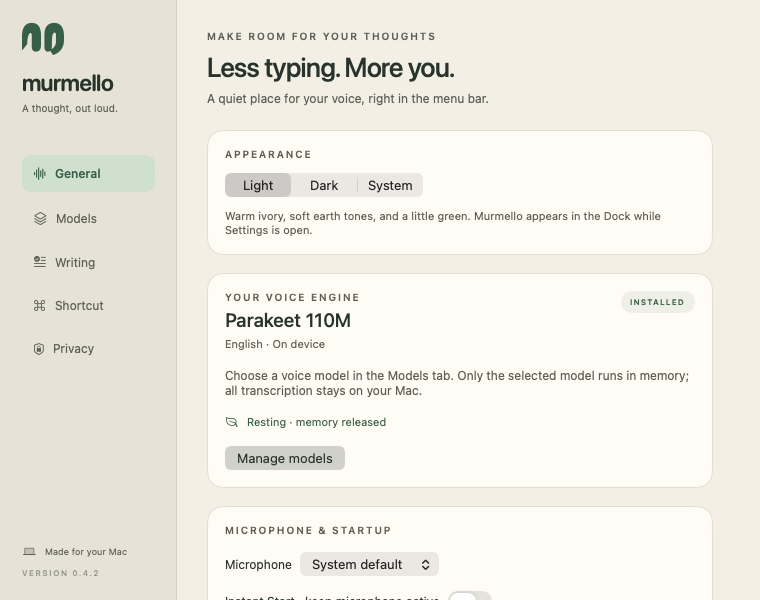
Set a keyboard shortcut or click your scroll wheel. Pick a voice model that suits your Mac. Choose a look that feels like you.
The real Murmello app, in light mode.
Speech recognition and optional text editing run on your device. Once your models are downloaded, dictation works offline.
A closer look at privacyBegin with the compact English model. Download a larger model or add multilingual dictation, with sizes and memory guidance shown in the app.
Find your modelKeyboard or mouse. Hold or toggle. Light, dark, or system appearance. Optional Instant Start keeps your microphone ready between dictations.
The little questionsA little closer to home
Once your models are downloaded, the entire dictation process happens right here. Even with the Wi-Fi off.
Private by designA small space for big thoughts
Start with English dictation. Add more languages or a local writing assistant whenever you want. You only download the models you choose.
Meet the projects behind Murmello1 GB
Room for the app, the compact English model, and setup files.
Actual storage varies with your models and macOS caches. Optional downloads add to it.
English · the starting point
English
English, Spanish + 23 languages
English, Spanish + 23 languages
Compact English editing
A larger multilingual editor
These are model file sizes, not total app storage or memory usage. Settings shows hardware guidance and available disk space before you download.
A note from the maker
Tomas Godoy Pastore
I set out to build a free, open-source alternative to Wispr Flow: natural voice dictation that runs entirely on your Mac. That’s how Murmello was born.
Murmello brings together the things I enjoy working on: useful AI, native software, and the details that make a product feel good to use.
Building something thoughtful? I’d love to hear about your team, a potential role, or an interesting collaboration.
tomasgpastore@gmail.comBefore you say hello
Yes. The app is free to download and use, with no subscription, account, or per-minute charge. Speech recognition and optional AI editing run on your Mac.
An Apple silicon Mac (M1 or newer) running macOS 14 Sonoma or later. Start with Parakeet 110M; we suggest 8 GB of total RAM and 1 GB of free space for its setup. Larger models have their own recommendations. Intel Macs, Windows, and iPhone aren’t supported.
Murmello does not upload your audio or dictation for processing. Audio is handled in memory, and the latest transcript stays available until you clear it or quit. Pasted text and clipboard contents are then handled by macOS and the apps you use. Model downloads contact external providers. Read the privacy notice.
Murmello pastes into the active text field using macOS Accessibility. It works with many apps that accept pasted text. Some protected fields or apps may prevent automatic insertion; the transcript remains available to copy and paste manually.
Yes, with either Parakeet V3 option in Settings → Models. The compact default is English-only. The V3 models support English, Spanish, and 23 additional languages with automatic language detection.
Microphone access lets Murmello hear dictation. Accessibility allows global mouse shortcuts and automatic pasting. Optional Instant Start keeps the microphone connected while idle; that audio is discarded. You can manage these choices in Settings.
No. Optional editing can improve wording and structure, but it can also make mistakes. Murmello checks for substantial changes and keeps the original when an edit fails those checks. You can recover the original from the menu. Always review text before sending it.
Explore the code and issues on GitHub. For questions, feedback, or a bug report, email Tomas. Please don’t include sensitive dictation in a public issue.
A little less typing starts here
Free local dictation. A quiet little place in your menu bar.
Version 0.4.3 · 224.9 MB
macOS 14+ · Apple silicon
Developer ID signed & Apple notarized
Open the DMG, then drag Murmello into Applications.
SHA-256: 702c01f42625ac93435f81b2cb4f2091d4ff6f5b09944e79c31929d2ccd9ec63